

Annotator Flasher
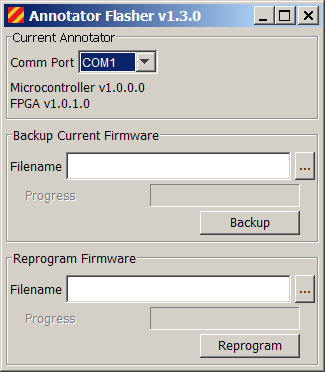 |
The Annotator Flasher utility is located on the
Tools menu. This utility can be
used to backup and reprogram the Annotator
FPGA configuration EEPROM. This utility connects to the
Annotator
through the configuration settings defined under Acquisition in the
Preferences
editor, and works over a direct copper cable, over the fiber optic
interface, or over the Ethernet interface. This utility will not be
present on the Tools menu if the
Acquisition mode is set to None.
The current Annotator microcontroller and FPGA firmware versions numbers are displayed in the top panel of the Annotator Flasher. Before installing new firmware, it is always a good idea to backup your old firmware. Do this using the Backup button in the Backup Current Firmware panel. You can specify any valid filename for your system, but normally the programming file will have a ”.rpd” extension. After your backup is complete, specify the filename for the new firmware in the Reprogram Firmware panel, then press Reprogram. Once this completes, you will need to exit Edgar, power cycle your instrument, then restart Edgar. |
Copyright © 2007
IONETRICS.com. All rights reserved • Website by Moondog Web Design 