

Configuration
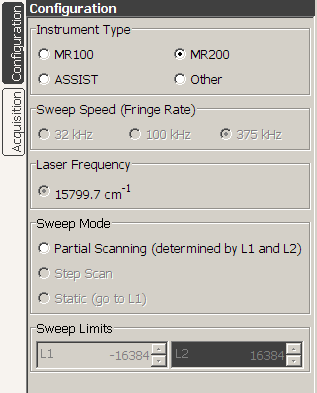 |
The Configuration panel is used to control instrument specific options, and in normal operation will not be used by most users. The Instrument Type is defined by the actual interferometer hardware in your system. The Sweep Speed options set the scan arm speed in terms of metrology fringe frequency. Available speeds will vary based on the Instrument Type. The Sweep Mode settings can be used to remove the instrument from the normal dynamic operating mode and place it in a Partial Scanning mode, with Sweep Limits set by the L1 and L2 controls. L1 and L2 are the minimum and maximum sweep points (in terms of metrology fringes) and are only enabled when in partial scanning mode. Otherwise, L1 and L2 will correspond to sweep limits required by the Spectral Resolution settings from the Acquisition panel. Step Scan mode is not currently implemented. In Static mode, the L2 input is disabled and the instrument is driven to a fixed position as specified in L1. Options are available for integrated control of aperture, blackbody, focus, INS, and scene mirror. Instrument control can be set up for a local direct connection, or as a client control for a network connected system. |
Copyright © 2007
IONETRICS.com. All rights reserved • Website by Moondog Web Design 