

Compute Spectrum
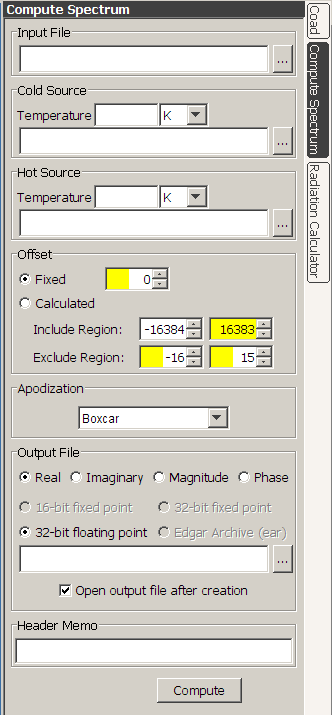
| The Compute Spectrum panel provides input fields
and controls for generating calibrated or uncalibrated spectra from
raw igram files. The Compute Spectrum panel is accessed
by pressing the Compute Spectrum tab on the right side of the
Edgar window. The Compute Spectrum operation can be
performed on raw igrams with no calibration to generate output in arbitrary
units(1), or a two-point calibration can be applied to produce calibrated
spectra(2). Computations can be performed on a single subfile, or on
a selected group of subfiles. To use the Compute Spectrum tool, you must at a minimum specify a raw igram Input File. This can be a single file or a multifile. You can also optionally specify a Cold Source file and Temperature, a Hot Source file and Temperature, the Offset calculation method, the Apodization method, and the Output File type and filename. Once your input parameters are specified, press the Compute button and Edgar will generate the output spectral file. The number of subfiles in the output file will match the number of subfiles in the input file. If a Cold Source and Hot Source are not specified, the output spectra will be uncorrected raw spectra. The X Units parameter in the header of the output file will be set to "Wavenumber in cm-1". If specified, the Cold Source and Hot Source must have exactly two subfiles, with the first subfile an igram for the forward direction, and the second subfile an igram for the reverse direction. The Temperature units may be specified in either K or C. The default is K. If C is selected, then 273.15 is added when computing the blackbody curve for the source. The Offset controls(3) are used to control calculation of an offset value that is subtracted from the raw igrams before the FFT operation is performed. The default is a Fixed offset of zero. If you select the Fixed Offset mode, you can enter any value you wish for the offset. If you select Calculated, you can set the include region and the exclude region to calculate the offset for the each subfile. All samples inside the include region are include in a sum (unless these samples fall inside the exclude region). The sum is divided by the number of samples in the region to calculate the offset. If the Calculated option is set when you press compute, a new offset will be calculated (and displayed in the offset box) for each scan as it is processed. The choices for Apodization method are Beer-Norton (weak), Beer-Norton (medium), Beer-Norton (strong), Blackman-Harris, Boxcar, Cosine, Gaussian, Hamming(4), and Triangular (also known as "Bartlet"). The Output File type can be specified to be Real, Imaginary, Magnitude(5), or Phase. By default, the output file is auto named by taking the input file and appending ".rrad" for Real, ".irad" for Imaginary, ".mrad" for Magnitude, and ".prad" for Phase. The name will be auto changed whenever you change the input file name, or whenever you select the output file type. You can also manually set the output file name to any valid file name. Currently, the only output option for spectral files is 32-bit floating point. The Header Memo field is used to enter text for the header memo. Text entered here will be appended to any text present in the memo field of the raw input file and placed in the memo field of the output file header. |
 |
(2) If both Cold Source and Hot Source are specified, the output units will be Spectral Radiance.
(3) The offset settings can also be set from a Python script.
(4) Also known as "Happ-Genzel". Apodized using
0.54 + 0.46 * cos{(pi/2) * [ abs(I - ZPD) / (NDP - ZPD)]}
where I is the array index, ZPD is the peak location, and NDP is the number of points in the igram.(5) The magnitude is defined as the square root of Real*Real + Imaginary*Imaginary
Copyright © 2007
IONETRICS.com. All rights reserved • Website by Moondog Web Design 